
Google drops new Pixel features in the June Security Patch


Once a quarter or every 3 months Google drops some pretty dope features for us, Pixel users. June is Pixel feature drop time and Google did not skimp on features this time around even though they’re hard at work on the next version of Android.


Check out what's new below. I can tell you right now I will be using the new astro-video feature and what they added to Gboard looks like it will be a useful time-saver.


Pixel owners love using astrophotography in Night Sight to take incredible photos of the night sky, and now it's getting even better. You can now create videos of the stars moving across the sky all during the same exposure. Once you take a photo in Night Sight, both the photo and video will be saved in your camera roll. Try waiting longer to capture even more of the stars in your video. This feature is available on Pixel 4 and newer phones.
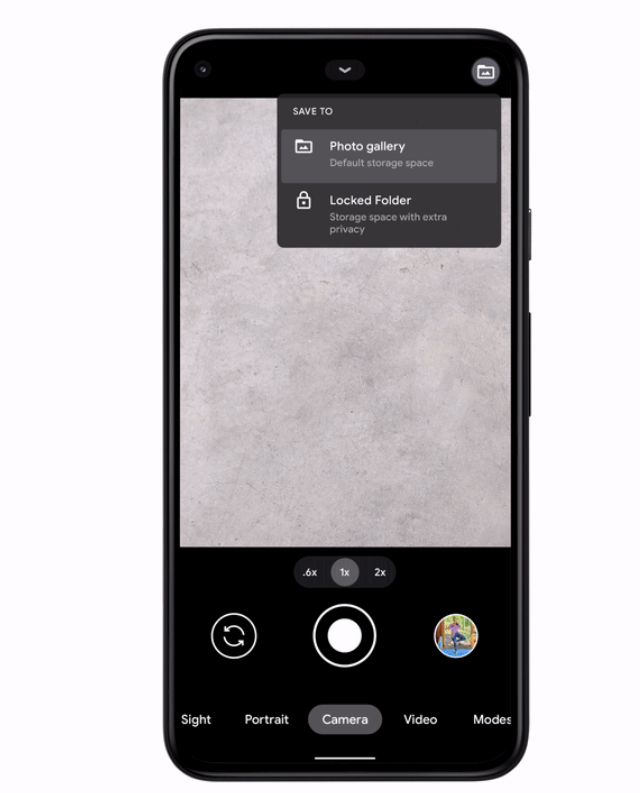


For photos and videos that need a little extra privacy — like pictures of an upcoming gift for a loved one, or screenshots of your recent receipts — you can save them to the new Locked Folder. 


Cutting and pasting important information also just got easier thanks to an even smarter Gboard. When you copy text that includes a phone number, email address or URL, you’ll see those key snippets of text suggested in the clipboard. You can easily drop them into places like Messages to share contact information quickly, or Maps to get started on your road trip faster.


Link(s)

Google


Comments

Popular posts from this blog

Waiting on Google: Why My Next Laptop Won't Be a Mac or PC (The "Googlebook" Era)

The release of the newly announced Googlebook cannot come fast enough for me. I am in the market for a new laptop and have my sights set on a Googlebook with the hope Google is making one. So far there are about five laptop manufacturers that are slated to be producing and releasing one this calendar year. Although, details are sparse surrounding the Googlebook I've seen just enough to know that I want this device to be a part of my tech ecosystem.  My current tech ecosystem Admittedly, I've been holding out for a minute to get a new laptop. Fortunately, my current device is still meeting my needs but barely. Right now, I am rocking a Pixelbook Go from 2019 and using a Pixel 10 Pro with a Pixel Tablet. I'm fine with this setup but my needs for more capable and powerful computing is getting harder to ignore. My Pixelbook Go does not seem as connected to my other devices as I would like which would explain why I don't use it as much. ChromeOS has not progressed much over ...

Comparing the JBL Live 770NCs to the Sony XM4s in 2025 | There's a clear winner (video)


The Pixel 11 Lineup Is Here: Unboxing the Pro, Watch 5, and Essential Accessories

  In what has turned into an annual tradition, I have picked up the all new Pixell 11 Pro and its siblings featuring the Pixel Watch 5, and the Pixel Buds Pro 2. I also got a couple of accessories with the matching Pixel case and Pixelsnap Ring Stand. Now, I am a creature of habit so I went with the black color way or Obsidian and Hazel respectively. Google did not change much in terms of design outside of the camera bar on the P11P and that is ok with me. I'm glad that Google went with a black bar design this year as it makes the phone look even more premium and flat out gorgeous. That's it for now. I'll get everything unboxed, set up and will share more soon.